
- Introduction: why and what
- Before the workshop
- During the workshop
- After the workshop
- Variations and alternatives
- Conclusion
- See also
Introduction: why and what
EventStorming, invented by Alberto Brandolini, is a collaborative workshop technique used in domain-driven design to explore complex business domains and systems. It brings together people from different disciplines, including developers, business analysts, domain experts, and project managers, to visualize and understand the domain events, business rules, and processes. The process involves using sticky notes and a large wall to map out domain events and their relationships, which helps identify business processes, bottlenecks, and potential improvements. The technique encourages open communication, knowledge sharing, and collaboration among the participants, enabling them to gain a better understanding of the business domain and system requirements. By using EventStorming, teams can improve their understanding of the business domain, identify issues and opportunities, and work together to design effective solutions. In this article, we will explore how to run an EventStorming workshop effectively when all participants are working remotely.
Before the workshop
Preparation is important before an eventstorming workshop because it helps ensure that the workshop is productive and effective. The facilitator should have a clear understanding of the objectives and the problem to be solved, as well as a plan for how to structure the workshop and engage participants. Adequate preparation can also help ensure that the necessary materials and tools are available for the workshop, whether it is conducted in person or remotely. Additionally, preparing ahead of time can help ensure that the right people are invited to participate and that they understand the purpose and goals of the workshop. We have outlined a few things to be mindful of.
Define the scope
It is crucial to be clear on the purpose of an EventStorming workshop before starting because it can help ensure that the session is focused and productive. EventStorming comes in a variety of flavors, each with its own specific focus and benefits. Big Picture EventStorming is useful for gaining a high-level view of the domain and identifying the key actors and events involved. Process EventStorming is useful for exploring specific business processes in more detail and identifying opportunities for improvement. Design Level EventStorming is useful for refining and optimizing specific designs or solutions based on the events and processes involved.
Your purpose can vary, depending on the goals of the organization or team, but it may include things like exploring a new domain, identifying areas for improvement, or defining requirements for a new project. Make sure which area of knowledge you want to model or understand. The more extensive the business process, the more time this method will take. Without a clear purpose, the session may become unfocused, and participants may struggle to stay engaged or generate valuable insights. Additionally, having a clear purpose can help the facilitator guide the session and structure the activities to achieve the desired outcome.
Invite the right people
Inviting the right people to an EventStorming session is crucial for its success. You will need people in at least these categories:
- People who know the answers: It will be very hard to conduct the session without these people being around: domain experts, product owners, clients, etc.
- People who know the questions to ask: This can be anyone who desires to obtain clarity on the problem. This is usually those who write the software: developers, architects, testers, etc.
- People who have the authority to make decisions: business stakeholders, sponsors, etc. This will ensure that the results of the EventStorming session are put into action and lead to meaningful outcomes.
- A good moderator and facilitator: This can be anyone on the team who is able to empathize, inspire and hold the attention of a group of people while being remote.
Having all four sets of people will ensure that all perspectives are considered, and that the resulting models are comprehensive and accurate.
Choose the right tools
Select a video conferencing tool that can support multiple participants, screen sharing, and a virtual whiteboard. A video conferencing tool like Zoom can be used to run a remote EventStorming workshop. It allows multiple users to join a single meeting, and also has features such as screen sharing and breakout rooms that can be used to facilitate the workshop. Similarly, there are several options for online whiteboarding tools like Miro, Mural, etc. Both offer a range of templates, virtual sticky notes and shapes that can be used to create event maps.
Provide instructions
Provide clear instructions to participants on how to access the video conferencing tool, the virtual whiteboard, and any other materials that may be used during the workshop. If necessary, conduct a dry run of the video conferencing tool and virtual whiteboard to ensure that everything is working properly before the workshop.
Expect challenges
Unlike an in-person session, running an EventStorming workshop remotely can present some challenges, such as:
- Communication: Remote workshops rely on technology for communication, which can lead to technical issues or miscommunication.
- Engagement: Participants may find it harder to stay engaged and focused during a remote session, especially if they are working from home and facing distractions.
- Lack of physical space: Participants may not have access to a physical space to gather materials or collaborate in the same way they would in an in-person workshop.
- Technical constraints: Some EventStorming tools may not work as well in a remote setting or may require additional setup or training.
- Time zone differences: Participants from different time zones may find it challenging to find a suitable time to attend the session.
It’s important to anticipate these challenges and plan accordingly to ensure a successful EventStorming workshop. Make sure to account for additional time to orient the group for the task ahead.
During the workshop
In a lot of ways, EventStorming can be like baking a pizza. While there may not be a whole lot of choice in the pizza base, a different assortment of toppings can make all the difference. EventStorming is similar in our experience. We have outlined a series of steps below, but it is not necessary that you follow in the same sequence or even conduct all of these. This sequence and steps have served us well, but your experiences may be different. So use them as a guideline as opposed to a rule.
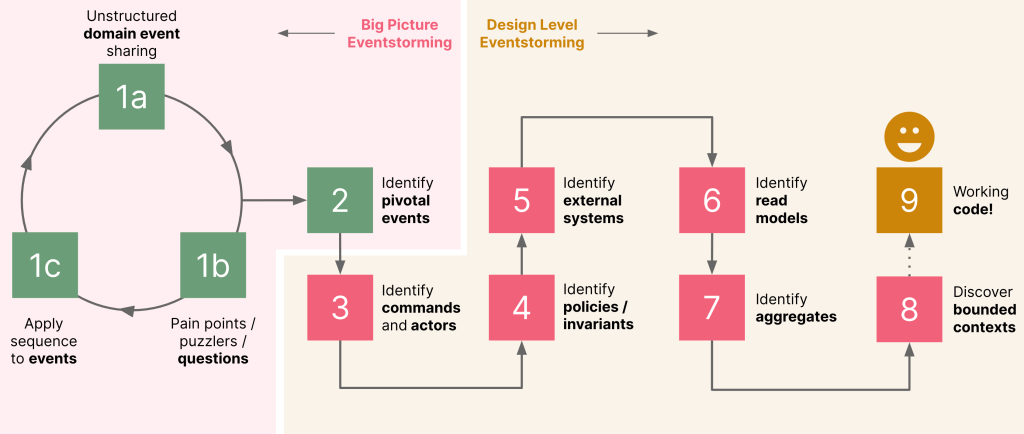
Step 1: Domain exploration
It is usual for most teams to start here to kickstart the process. We usually see this manifest itself in three distinct set of activities:
a. Unstructured domain event sharing
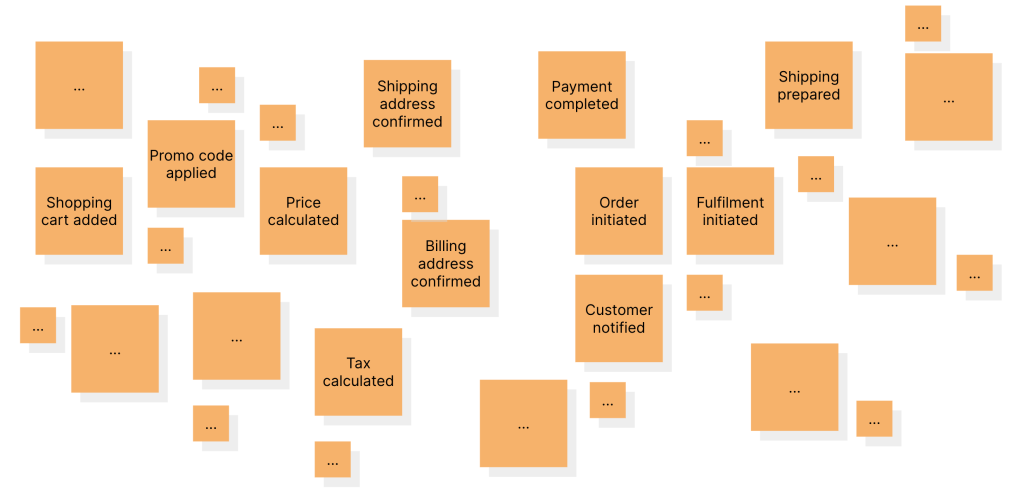
In this phase, we request all participants to brain dump domain events onto the board while resisting the temptation to impose constraints of any kind. This can be quite chaotic, at least for a period of time. But it can also reveal very interesting insights once the chaos begins to settle. Usually, we let this activity carry for a preset time-box amount or until domain event stickies start appearing on the board (whichever comes earlier). After this stage, your board may start to look something like this:
b. Pain points, puzzlers and questions
As the board starts to fill up with these orange domain event stickies, participants usually start having questions. Some stickies may be duplicates, incoherently names, inconsistent, misunderstandings, or a combination of more than one of the above. Each of these may indicate problem areas or those where the group doesn’t have enough clarity or simply those that require special attention. The facilitator should encourage participants to start surfacing these pain points on the board like so:
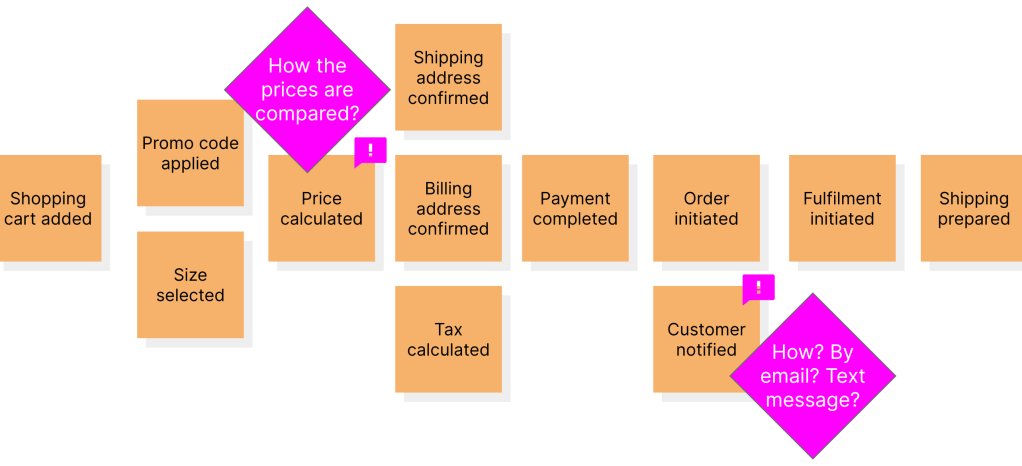
These pain point stickies usually require clarification and can evoke insightful conversations which can then result in additional domain events being discovered.
c. Apply sequence to events
So far we have asked participants to simply place domain events on the board. As we start accumulating these domain events, the facilitator (with help from others) can start making sure that these events follow a timeline.Events that can happen in parallel can be placed in the same column.
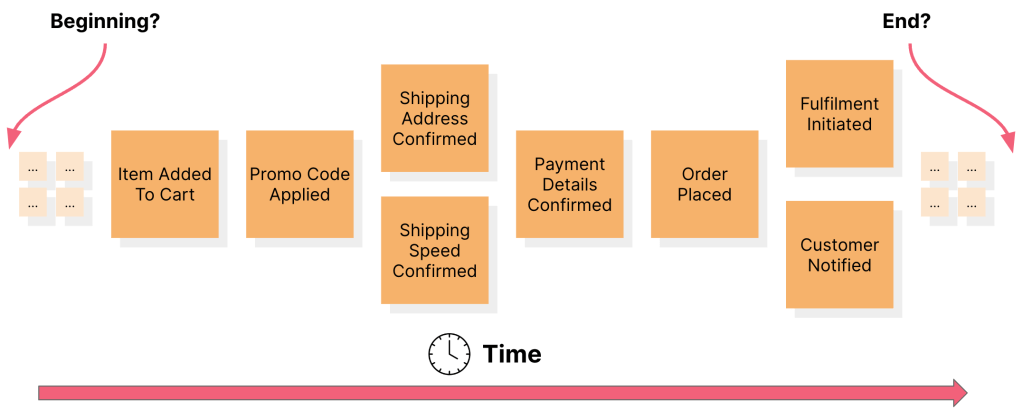
This process of adding domain events, raising pain points and enforcing a timeline sequence can take a few iterations before order starts emerging from the chaos. The idea is to find the beginning, the end of the flow and everything in between until a domain expert or stakeholder tells us that it is out of scope. Depending on the scope of the problem, this process may take anywhere from a few hours to a few days. At this stage you will start seeing the business flow and may choose to stop because you may have simply wanted everyone on the team to arrive at a shared understanding of the flow.
Step 2: Identify pivotal events
As we progress through the workshop, business experts will point out that certain domain events are important than others. These events usually indicate the beginning or the end of something significant to the business. These pivotal events are important to identify because they can help the team understand the most important parts of the system, and can guide the design of the system. It is not uncommon for lots of people to be interested in these events, providing another clue into how important they are.

Step 3: Identify commands and actors
During an eventstorming session, commands are identified as the actions that are initiated by the actors within the system. Actors are the users, devices, or external systems that are responsible for triggering these commands. This helps in understanding the system’s behavior by identifying who or what initiates the changes and who or what responds to those changes. This understanding can be leveraged to design systems that are more aligned with the business goals and requirements.

Step 4: Identify policies and business invariants
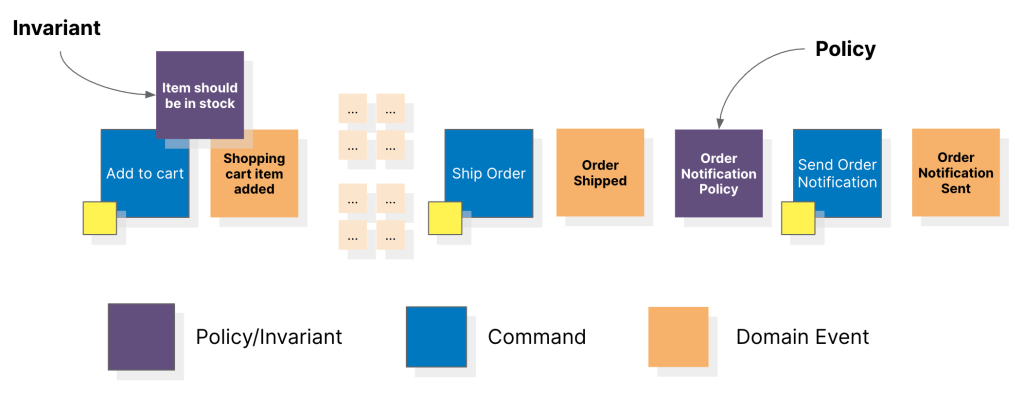
Certain domain events may trigger other downstream processes. In other words, a reaction to an event (whenever “this” happens, we do “that”). Policies are the things we do in reaction to domain events. Policies may be manual or automated. Business invariants, on the other hand, are rules that need to be adhered to when processing a command. If these invariants are not upheld, the command is rejected and the domain event does not result. By identifying policies and business invariants, the team can gain a better understanding of the constraints and rules that govern the system and design the system accordingly.
Policies usually take the form of event-policy-command whereas business invariants take the command-invariant-event format, with both being equally invaluable
Step 5: Identify external systems
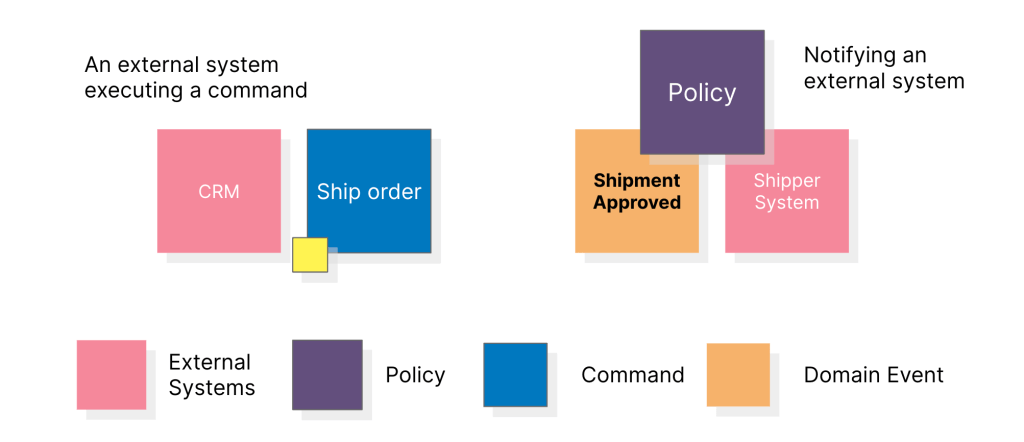
At this stage, external systems are identified and their interaction with the system under design is explored. External systems are any systems that interact with the system being designed, but are outside of the control of the development team. Examples of external systems could include other applications, APIs, or third-party services. Understanding the interactions between the system being designed and external systems is important for designing the system in a way that integrates smoothly with those external systems. Additionally, identifying external systems can help identify any potential issues or constraints that need to be considered during development.
Step 6: Identify read models
When making decisions (for e.g. when applying business invariants), we need information. Read models are those pieces of information. They represent the state of the system at a particular point in time, based on the events that have occurred up to that point. They can also be used to drive the development of user interfaces, reports, and other outputs that are required by the system. Read models are often implemented using a separate set of data structures or objects, which can be updated in response to new events as they occur.

Step 7: Identify aggregates
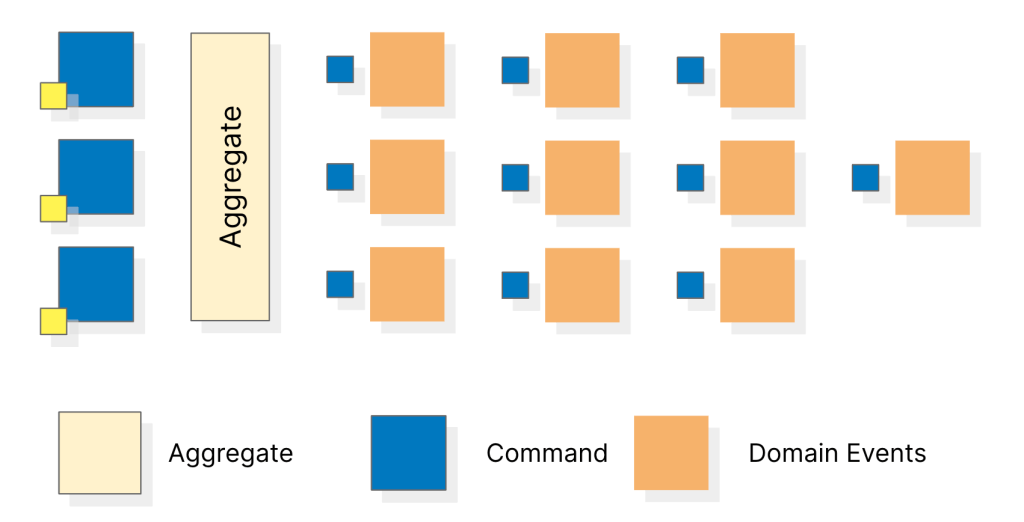
Now that we have a pretty decent idea of the overall system, we can start grouping related events that maintain consistency boundaries into an aggregate. To identify aggregates, you can look for sets of events that share common data or state changes, and then group them together based on their semantic relevance. Some techniques for identifying aggregates include:
- Looking for sets of events that have a common noun in their names, such as “Order Placed” and “Order Shipped” which may indicate an Order aggregate.
- Identifying a group of events that are always processed together as part of a transaction, which may indicate an aggregate.
- Examining the data and state changes associated with a set of events and grouping them together based on their relevance and consistency boundaries.
It’s important to note that the process of identifying aggregates is iterative and may require multiple passes over the event map to refine the grouping and ensure consistency boundaries are properly maintained.
Step 8: Identify bounded contexts
Once aggregates have been identified during an eventstorming session, discovering bounded contexts requires analyzing how the aggregates interact with each other and the external systems. The aim is to group the aggregates that are closely related to each other and isolate them from other aggregates that have minimal interactions with them. This grouping process is based on the concept of a consistency boundary, which defines the scope within which data consistency is guaranteed. The aggregates within a consistency boundary are designed to be consistent with each other, while the aggregates across different consistency boundaries may have different consistency rules. Once bounded contexts have been identified, they can be designed to have well-defined interfaces between them to ensure that they can communicate effectively while maintaining data consistency within their respective consistency boundaries.
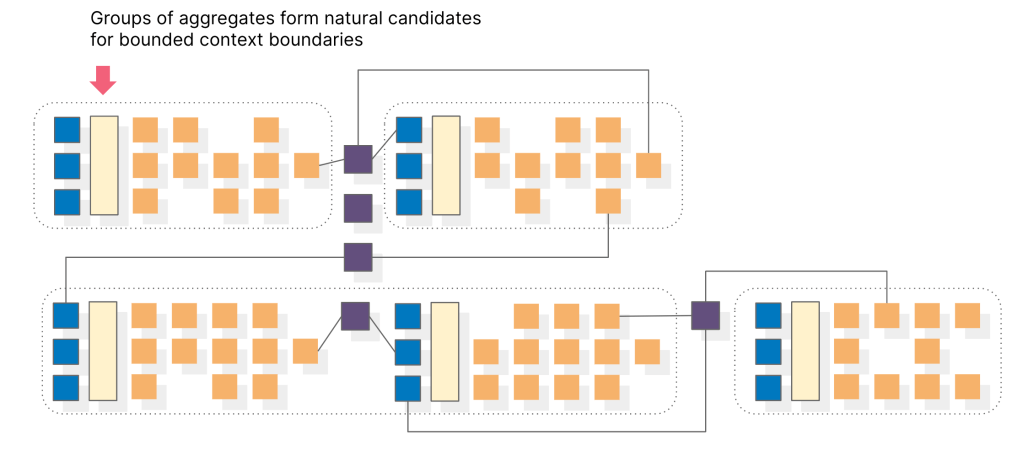
If you have have made it thus far, congratulations! You have successfully laid the foundation for defining the bounded contexts in your domain model, which will serve as a critical step towards building a well-structured and scalable system architecture.
After the workshop
Like most other things, EventStorming is a tool. In our opinion, it is a very effective tool, but without affirmative followup action, the insights obtained can go stale quickly and can also lead to frustration and demotivation among the participants who may feel that their contributions were not valued or acted upon. After an eventstorming workshop, some key activities that can be carried out as action items are:
- Refining and documenting elements: The identified events, commands, actors, aggregates and bounded contexts can be further refined, prioritized, and documented.
- Developing a domain model: The refined events, aggregates, and bounded contexts can be used to create a domain model, which can help in understanding the domain and its complexity.
- Developing user stories: The identified commands and actors can be used to develop user stories, which can provide a deeper understanding of user needs and help in developing better products.
- Designing the system: The domain model, user stories, and identified read models can be used to design the system architecture and identify the necessary components and services.
- Conducting further analysis: The refined events, aggregates, and contexts can be used to conduct further analysis, such as risk analysis, impact analysis, and feasibility analysis.
- Planning next steps: Based on the results of the workshop and the action items identified, a plan for next steps can be developed, including timelines, resources, and responsibilities.
Step 9: Code..!? Really?
We mentioned working code as one of the possible artifacts in step 9 when we described the process at a high level earlier.
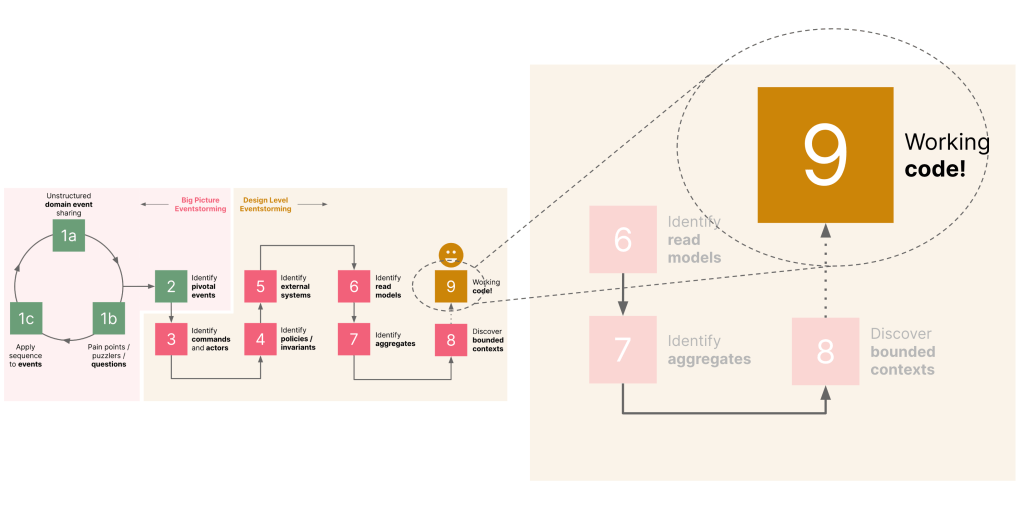
While this step might seem a bit implausible, it is not out of the realm of possibility. And we are not talking about pseudo code or something that we intend to use for demonstration purposes. Here is an example of a JUnit test from the Letter of Credit (LC) application example we covered in the book:
public class LCApplicationAggregateTests {

  // Other code and tests omitted for brevity
   @Test
    void shouldAllowSubmitOnlyInDraftState() {
        final LCApplicationId applicationId = LCApplicationId.randomId();
        fixture.given(new LCApplicationCreatedEvent(applicationId))
                .when(new SubmitLCApplicationCommand(applicationId))
                .expectEvents(new LCApplicationSubmittedEvent(applicationId));
    }
}
And here is an excerpt from the aggregate itself:
public class LCApplication {

    @AggregateIdentifier
    private LCApplicationId id;
    private State state;

    @SuppressWarnings("unused")
    private LCApplication() {
        // Required by the framework
    }

    @CommandHandler
    public LCApplication(CreateLCApplicationCommand command) {
        // Validations omitted for brevity
        AggregateLifecycle.apply(new LCApplicationCreatedEvent(command.getId()));
    }

    @EventSourcingHandler
    private void on(LCApplicationCreatedEvent event) {
        this.id = event.getId();
        this.state = State.DRAFT;
    }

    @CommandHandler
    public void submit(SubmitLCApplicationCommand command) {
        if (this.state != State.DRAFT) {
            throw new AlreadySubmittedException("LC is already submitted!");
        }
        apply(new LCApplicationSubmittedEvent(id));
    }

    @EventSourcingHandler
    private void on(LCApplicationSubmittedEvent event) {
        this.state = State.SUBMITTED;
    }

    enum State {
        DRAFT, SUBMITTED, ISSUED
    }

    // Other code omitted for brevity
}
Admittedly, this example employs an event-driven style of architecture. However, given the work we did in uncovering domain events, commands, business invariants, etc. during the workshop, allows us to very easily test-drive robust solutions that closely represent the business problem. In an upcoming post, we will look at the solution aspect in a lot more detail.
Variations and alternatives
EventStorming is a popular workshop format for collaborative exploration of complex domains, particularly in the context of event-driven architecture and domain-driven design. While EventStorming is an effective approach for many organizations, there are several variations and alternatives that may better suit specific situations or preferences. Here are some of the most notable variations and alternatives:
- Example Mapping: Example Mapping is a technique that combines user stories with concrete examples to help teams better understand user needs and define acceptance criteria. Example Mapping is often used as a complement to EventStorming, especially during the refinement of user stories and acceptance criteria.
- Value Stream Mapping: Value Stream Mapping is a technique used to visualize the flow of work and identify areas of inefficiency or waste. It is commonly used in lean manufacturing and agile software development. Value Stream Mapping can be a useful alternative to EventStorming for organizations that are focused on process optimization.
- User Story Mapping: User Story Mapping is a technique for visualizing and organizing user stories. It can be used to break down a large project into smaller, more manageable chunks and prioritize user needs. User Story Mapping is an excellent alternative to EventStorming for organizations that are focused on software development.
- Design Studio: Design Studio is a collaborative design technique that combines sketching, feedback, and critique. It is often used for designing user interfaces, but it can also be applied to other domains. Design Studio can be a useful alternative to EventStorming for organizations that are focused on user interface design.
- Impact Mapping: Impact Mapping is a technique for visualizing the impact of a project and identifying the most critical goals. It can be used to ensure that everyone on the team understands the purpose and value of a project. Impact Mapping is an excellent alternative to EventStorming for organizations that are focused on strategic planning.
- Domain Storytelling: Domain Storytelling is a technique for capturing and sharing domain knowledge in a structured way. It is used to create a shared understanding of the domain and the problems it solves. Domain Storytelling is an alternative to EventStorming that emphasizes narrative and storytelling.
- Event Modeling: While EventStorming focuses in discovering the problem space, Event Modeling creates a blueprint for a solution, making use of screen mockups to drive the process. Because Event Modeling doesn’t take a long time, it can also act as a problem space exploration exercise by trying multiple solutions.
Conclusion
In summary, remote EventStorming is a powerful technique for teams that want to collaboratively explore complex domains and identify the events and processes involved. With the rise of remote work, it has become increasingly important for teams to be able to use EventStorming in a remote context. By using online whiteboards, video conferencing, and other collaboration tools, teams can effectively simulate a similar level of collaboration and interaction that they would experience in an in-person session. Remote EventStorming has the potential to unlock new levels of creativity, innovation, and efficiency, and it can help teams to build a shared understanding of the domain, identify key opportunities, and drive business success. By following best practices for remote collaboration and leveraging the power of technology, teams can successfully use remote EventStorming to tackle even the most complex and challenging domains.
See also
| Title | Notes |
| Chapter 4: Domain Analysis and Modeling | In our book, we discuss how EventStorming and other techniques can be used to go from vague concept to high quality working software. |
| Remote EventStorming (not Event Storming): Redesigning Everything | Alberto Brandolini discusses the learnings from remote EventStorming in his inimitable, no-nonsense style. |
 Domain-driven Design: A Practitioner's Guide